Thursday, October 29, 2015

Wednesday, October 28, 2015
BSNL GO GREEN INITIATIVE
BSNL Launched GO GREEN INITIATIVE
Offers Loyalty Reward Points to Customers
Every small 'GREEN' step taken today would go a long way in building a greener future and that each one of us can work towards a better global environment.
Under this initiative BSNL is encouraging its customers to “GO-GREEN “ by subscribing telephone bills on “ Email “ . This will reduce the consumption of paper inprinting the telephone bills and delivery of bills on cost efficient automated channels basis thereby building awareness and consciousness of environment protection.
India’s most trusted Telecom brand Bharat Sanchar Nigam Limited (BSNL) offers 10 Loyalty Reward Points to BSNL Landline and Broadband customers who opt for getting their bill through "E- mail Only" option and also Hassel free immediate receipt of telephone bill through "EMAIL".

How to get Landline / Broadband Telephone Bill On E-Mail
· Activation by Customer by Sending SMS at 53334
Customer can send SMS to 53334 with following format.
EMS _<Billing_Account_Number> _<Email_Id>
· Customer can log in to web self care portal http://selfcare.ndc.bsnl.co.in and place their request for getting telephone bill on “Email only “ option .
Procedure – Click on active Account Number in My Account section. Then Choose Email option from dropdown list in billing preference and press “Submit Request” button.
· Customer can approach Customer Service Center and give request for "Email only" option.
· Customer can approach BSNL Call Center by dialing 1500 and register number for e-bill.
Tuesday, October 27, 2015
FTTH Overview
Fibre to the Home (FTTH) is a unique technology being deployed by BSNL for the first time in India. The fibre connectivity having unlimited bandwidth and state of the art technology provides fix access platform to deliver the high speed broadband from 256 Kbps to 100 Mbps, IPTV having different type of contents like HDTV and future coming 3D TV and range of voice telephony services. It provides a comprehensive solution for the IP leased line, internet, Closed User Group (CUG), MPLS-VPN, VoIP, video conferencing, video calls etc whatever the services available on the internet platform, bandwidth on demand can be delivered by this connectivity to the without changing the access fibre and home device. Customer will get a CPE called Home Optical Network Termination (HONT) consist of 4X100 Mpbs Ethernet ports and 2 normal telephone ports. Each 100 Mbps ports will provide broadband, IPTVs, IP Video call and leased line etc as required by the customers. Customer will get power back unit having full load backup of four hours and normal backup of three days. This power backup will be AC input and connecting to the HONT on 12V DC.
Tuesday, October 20, 2015
Top-up your BSNL Broadband Plan with FUP( Fair Usage Policy)
FUP Topup
FUP Activation Tutorial
Actually all BSNL DataOne unlimited plans allow you to browse on Internet and download data on high-speed but when you cross the FUP limit as per the plan, your Internet speed is automatically reduced. You can still browse on Internet and download files but you'll notice a huge speed drop.

The page is having a button : UPGRADE. Since you need high-speed, you can purchase more GB of data by clicking on UPGRADE button.
The UPGRADE button launches a new page containing various options to add additional data transfer quota at higher speed along with their charges details.
The available options were as following:
2 GB for Rs. 50
5 GB for Rs. 100
10 GB for Rs. 150
20 GB for Rs. 250
5 GB for Rs. 100
10 GB for Rs. 150
20 GB for Rs. 250
Select the desired quota option and clicked on [Go] button and it showed the successful message:
Dear Customer
Thanks for choosing speed restoration plan.
You will be charged in the next bill...
Please restart your modem to browse with higher speed as per your plan.

Restart the modem, the broadband plan speed was restored to original high-speed.

Manage your FTTH Account via Selfcare Portal
To manage the BSNL FTTH Account click at the following Image
After registration you can do the following
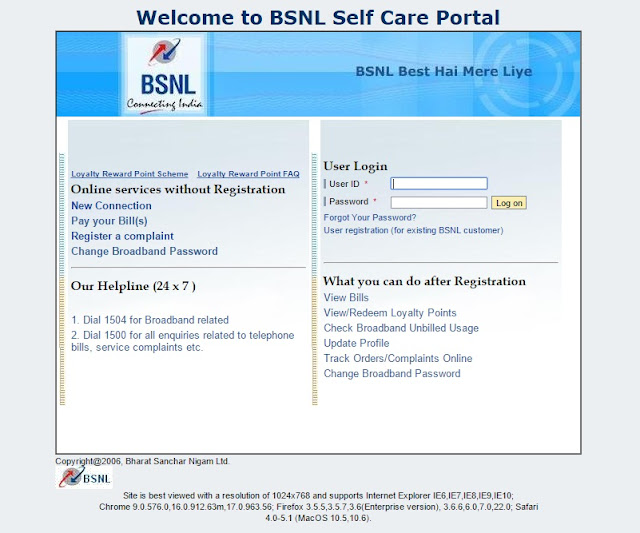
After registration you can do the following
| * View Bills | |
| * View/Redeem Loyalty Points | |
| * Check Broadband Unbilled Usage | |
| * Update Profile | |
| * Track Orders/Complaints Online | |
| * Change Broadband Password |
Subscribe to:
Posts (Atom)